


Like almost all CRMs, without a deliberate strategy, your HubSpot portal can quietly accumulate clutter. Unused properties, broken workflows, duplicate contacts, and outdated integrations build up over months and years. Before you know it, your CRM is slowing down your team instead of helping them close deals.
A HubSpot health check gives you a clear picture of what's working, what's broken, and what needs attention. This guide walks you through each area of your portal with practical steps you can follow today. Concentrate helps B2B teams run these audits regularly to keep their CRM aligned with business goals.
By the end, you'll have a repeatable framework for diagnosing portal issues and prioritising fixes that deliver real results.
Key takeaways: How to audit HubSpot portal health in 2026
- A HubSpot health check reviews data quality, workflows, integrations, and user permissions to find hidden inefficiencies.
- Duplicate contacts and incomplete records inflate costs and erode trust in your CRM reporting accuracy.
- Broken workflows fail silently, disrupting lead routing and customer onboarding without anyone noticing for weeks.
- Regular audits every six to twelve months prevent small issues from compounding into major operational problems.
- Concentrate's HubSpot Services help B2B teams run portal audits and implement practical improvements quickly.
What is a HubSpot health check?
A HubSpot health check is a structured review of your entire portal. You're looking at data quality, automation processes, system integrations, user permissions, and reporting accuracy. The goal is to find inefficiencies before they become expensive problems.
Think of it as preventative maintenance for your CRM. Just as you'd service a vehicle regularly, your HubSpot portal needs periodic inspection to run smoothly.
This isn't about ticking boxes. A proper audit examines whether your CRM setup still matches how your business operates today. Teams evolve, processes change, and your portal should keep pace.
Why does your HubSpot portal need regular audits?
Every new campaign, imported list, and workflow experiment leaves behind artifacts. Over time, these accumulate and drag down performance. Your sales team starts creating their own spreadsheets. Marketing emails bounce. Reports tell the wrong story.
The costs are real. Duplicate and disengaged contacts push you into higher HubSpot pricing tiers without delivering value. Broken automations create gaps in your customer experience that go unnoticed for weeks.
Regular audits catch these issues early. You maintain a single source of truth for customer data, which means accurate forecasting and smarter decisions.
When should you schedule a HubSpot health check?
At minimum, run a full audit once a year. This ensures your portal starts each planning cycle with a clean foundation. For fast-growing B2B companies, quarterly reviews work better.
Certain events should trigger an immediate audit. A merger or acquisition changes everything about how you use your CRM. Launching a new product line adds complexity. Integrating a major new system introduces potential sync failures.
Don't wait for visible problems. By the time your team complains that HubSpot feels "clunky," the underlying issues have likely been building for months.
How do you audit contact data quality in HubSpot?
Start with your contact database. This is the foundation everything else sits on. If your data is unreliable, segmentation, automation, and reporting all inherit that unreliability.
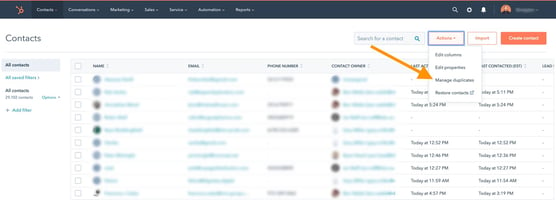
Run HubSpot's built-in duplicate management tool under Contacts, then Actions, then Manage Duplicates. Review the suggested matches and merge where appropriate. Pay attention to contacts with similar email addresses but different formatting.
Check your bounce rate. Hard bounces above two percent signal list hygiene problems. Remove hard-bounced contacts from active lists immediately. Monitor your unsubscribe rate too. A rising trend suggests frequency or relevance issues.
What contact properties should you review?
Identify which contact properties are critical for your business processes. Then measure their fill rates. Properties with completion rates below fifty percent need attention.
Progressive profiling on forms can help. Enrichment tools fill in gaps automatically. For imported data, establish cleaning routines during the import process itself.
Email should be near one hundred percent complete. First name, last name, company, and lead source are typically essential. Job title matters for B2B segmentation.
How do B2Bs audit HubSpot properties and custom objects?
HubSpot portals accumulate properties quickly. Between default fields, integration-created properties, and custom additions from different team members, most portals have far more properties than they actually use.
Export the full property list for contacts, companies, deals, and tickets. Navigate to Settings, then Properties, and export each object. Look for properties with zero or near-zero fill rates. If nobody populates a field, it clutters forms and views for no reason.
Search for redundant properties capturing the same information in slightly different ways. "Industry" versus "Company Industry" versus "Vertical" is a common example.
What should you check for custom objects?
If your portal uses custom objects, verify that association labels are meaningful and consistently applied. Required properties should be enforced. Custom object pipelines need to reflect your current business processes.
Check whether API integrations interacting with custom objects still function correctly. A broken connection here can cause data gaps you won't notice until reporting time.
How do you audit HubSpot workflows and automation?
Workflows are often the most neglected area during audits. They're also the most impactful to fix. A single broken workflow can silently disrupt lead routing or deal progression for weeks before anyone notices.
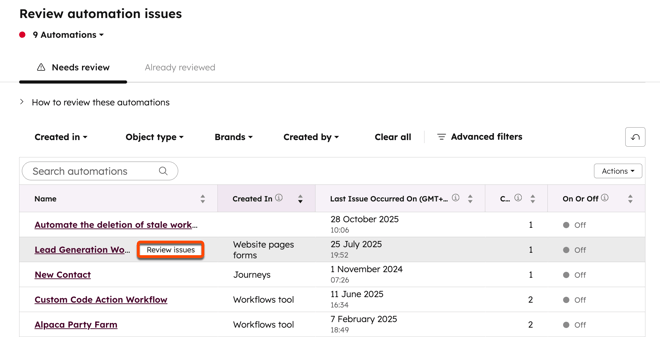
Click the "Review automation issues" button at the top left of the workflow page. This is your starting point for identifying workflows that aren't doing what they should.
Start with workflows that are currently active. Review those showing errors. Fixing issues might require updating triggers, changing property references, or reconnecting deleted lists.
What are common workflow problems?
Enrollment triggers referencing deleted lists or changed property values cause silent failures. Send-email actions pointing to archived templates create gaps in communication sequences.
Branch logic using renamed or removed properties breaks the decision tree. Integration-triggered actions stop working when the connected app gets disconnected.
Always ask why a workflow was created before making changes. Communicate updates with all teams involved so downstream processes aren't affected unexpectedly.
How do you audit HubSpot forms and landing pages?
Forms are your primary data collection mechanism. They deserve regular scrutiny. Identify forms with zero submissions in the last ninety days. Are they still embedded on active pages? If not, archive them.
Review field count on each form. Keep top-of-funnel forms under seven fields to maintain conversion rates. Consider progressive profiling to gather additional information over time.
Verify every form triggers the correct thank-you page and notification email. Check GDPR consent checkboxes and privacy policy links are present and functioning.
How do you audit HubSpot lists?
Lists are one of the most over-created assets in HubSpot. Marketing teams create new lists for every campaign. Without cleanup, the list library becomes unmanageable.
Sort by last updated date. Lists not touched in six or more months are candidates for deletion. Before deleting, check whether they're referenced in active workflows, ads audiences, or email sends.
Review active list criteria. Overly broad or outdated criteria may include contacts incorrectly. Consolidate multiple lists targeting the same segment with slight variations into a single well-defined list.
How do you audit HubSpot reports and dashboards?
Reports are only as good as the data feeding them and the questions they answer. Many portals carry dozens of reports nobody looks at while missing dashboards teams actually need.
Identify orphan reports not assigned to any dashboard. Verify data sources reference current properties and pipeline stages. Test calculated fields against raw data to confirm accuracy.
Ensure every dashboard has a clear owner responsible for maintenance. Add date-range comparisons to track trends rather than just snapshots. Remove dashboards tied to completed campaigns or former team members.
How do you audit HubSpot integrations?
Every connected app is a potential point of failure and a potential security risk. Navigate to Settings, then Integrations, then Connected Apps. Make sure everything that should be connected still is.
Look into each connected integration to verify there are no lasting errors. Custom integrations need particular attention. A broken connection to your accounting software or a faulty data sync creates significant data silos.
Check API call volumes against rate limits. HubSpot allows one hundred calls per ten seconds for OAuth apps and two hundred thousand calls per day. Approaching these limits triggers performance issues.
How do you test integration health?
Create a test record and verify it appears in the connected system. Review error logs in HubSpot's sync health dashboard. Confirm webhook endpoints are still active and responding.
Verify private app tokens haven't expired. Use the "record details source" property to see which integration created specific records in your CRM.
How do you audit HubSpot user permissions?
Poorly managed permissions lead to accidental data changes, unauthorised exports, and compliance violations. Check for inactive users and deactivate former employees immediately.
Review how many users have Super Admin access. Too many creates opportunity for uncoordinated changes. Most users need role-based access tailored to their function.
Verify team assignments match your current organisational structure. Restrict bulk data export to designated administrators only. Enforce two-factor authentication for all users, especially those with elevated permissions.
What is the HubSpot data quality command centre?
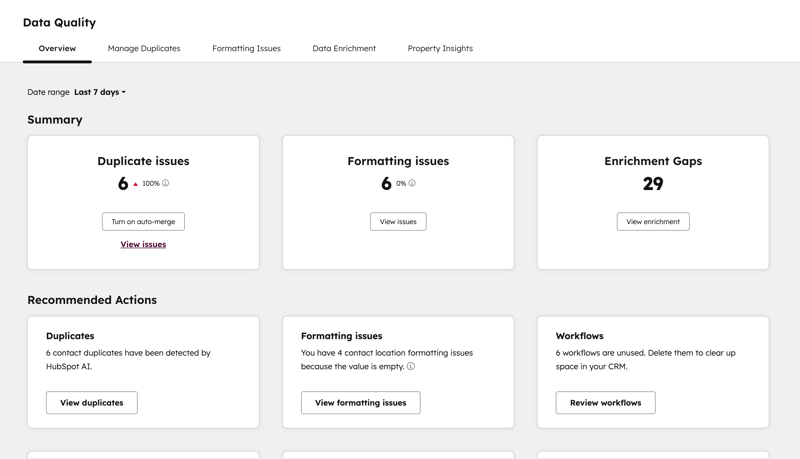
HubSpot's Data Quality Command Centre gives you a centralised view of your data health. It identifies duplicates, formatting errors, and incomplete records automatically.
Access it through Settings, then Data Management, then Data Quality. You'll see a summary of issues affecting your contact, company, and deal records.
Use the suggestions to merge duplicates and fix formatting inconsistencies. Set up ongoing monitoring alerts so new issues surface quickly rather than accumulating over months.
How do you monitor marketing contact tiers?
Marketing contact tiers affect your HubSpot costs. Click your company name icon in the top right, then scroll to Accounts and Billing, then the Usage and Limits tab.
If your marketing contact count exceeds your current tier, HubSpot automatically moves you to a higher tier with additional cost. The change takes effect the following calendar month.
Set contacts to "non-marketing" status when they shouldn't receive marketing communications. Check which forms and automation rules are setting marketing contact status automatically.
How do you prioritise HubSpot audit findings?
Completing the checklist is step one. The real value comes from prioritising what you found. Categorise every finding by business impact and effort to resolve.
High-impact issues affect revenue, customer experience, or team productivity directly. Medium-impact issues create inefficiency or data quality degradation over time. Low-impact issues are cosmetic or minor inconveniences.
Start with high-impact quick wins. These deliver visible improvements fast and build organisational momentum for tackling bigger projects.
What quick wins can you implement immediately?
Some fixes take minutes and deliver noticeable improvements. Build reports that highlight missing data on critical fields. Use these to establish a culture of CRM hygiene.
For contacts, check last name, email, and domain fields. For deals, verify close dates, amounts, and won/lost reasons are populated. For tickets, confirm correct stages and associations.
Review tasks with completion dates in the past. These create noise in your system and frustrate users who see overdue items they can't control.
How often should you run HubSpot health checks?
Annual audits work for stable businesses with straightforward setups. Quarterly reviews suit fast-growing organisations or those with complex automation and multiple integrations.
Implement monthly monitoring for key health indicators between formal audits. Track duplicate creation rates, workflow error rates, and user activity levels. Set up dashboards that surface problems automatically.
Concentrate's HubSpot Services include ongoing portal optimisation. Regular check-ins catch issues before they compound into systemic problems.
What happens after a HubSpot health check?
You'll have a detailed picture of your portal's health, including strengths, weaknesses, and prioritised recommendations. The next step is creating an implementation roadmap.
Some fixes are quick wins you can complete immediately. Others are larger projects requiring planning and resources. Sequence them based on impact and effort.
Don't just deliver a report and walk away. Working with a HubSpot partner ensures recommendations actually get implemented and results get measured.
In conclusion: Building a healthier HubSpot portal
A healthy HubSpot portal isn't a one-time achievement. It's an ongoing practice. Regular audits prevent the slow degradation that turns a powerful CRM into a cluttered obstacle.
Start with the areas causing the most friction for your team. Fix duplicates, repair broken workflows, and clean up unused properties. Build monitoring into your routine so issues surface early.
The payoff is a CRM your team trusts and uses consistently. Better data quality means more accurate forecasting. Streamlined automation means faster response times. And that translates directly to revenue growth.
Share this

Inbound marketing driven by HubSpot helps electronics pioneer reinvigorate global marketing and sales
.png?width=1920&height=1000&name=Concentrate%20-%20Blog%20Hero%20Images%20(12).png)
Concentrate joins top 3% with HubSpot Onboarding Accreditation
-Mar-13-2025-04-47-21-2857-AM.png?width=3000&height=2000&name=Concentrate%20-%20Blog%20Hero%20Images%20(1)-Mar-13-2025-04-47-21-2857-AM.png)